A sane but extremely bull case on OpenClaw (Clawdbot)
over the past week the discourse around openclaw (fka clawdbot) has absolutely exploded. it has felt to me like all threads of conversation have veered towards the extreme and indefensible. some are running openclaw with unlimited permissions on their main computers. others are running it in the cloud and blowing through tokens like snow. finally, alarmingly (and very sensationally), people are connecting their openclaws together on a social network so they can plot the demise of their humans together.
does any of this make sense? of course not. but i think the virality and silliness—leading many to conclude that sitting this one out is the only sane choice—has blinded people to something real.
i want to quickly write down where i am on my journey and share a bull case from what i think is a reasoned perspective. i went in looking for reasons to use openclaw—whenever i had a hunch something might work, i built it. not all of these are necessary, but i wanted to see what was possible. where i started somewhere lukewarm, i ended up much closer to the deep end than i expected to be. after wincing before pressing go, i'm now not sure i want to go back to a world without openclaw.
this article covers what i've built, how i think about the risk, and what it's taught me about this moment in AI. the target audience is a moderately+ technical person interested in or skeptical of openclaw. if you just want the setup details, skip to the end. everyone's welcome!
what i’ve been doing
i'll be vulnerable here (screenshots or it didn't happen) and share exactly what i've actually set up. i deliberately leaned into building more than less—i wanted to stress-test what openclaw could do, not find the minimum viable setup.
staying on top of messages
never forgetting about texts
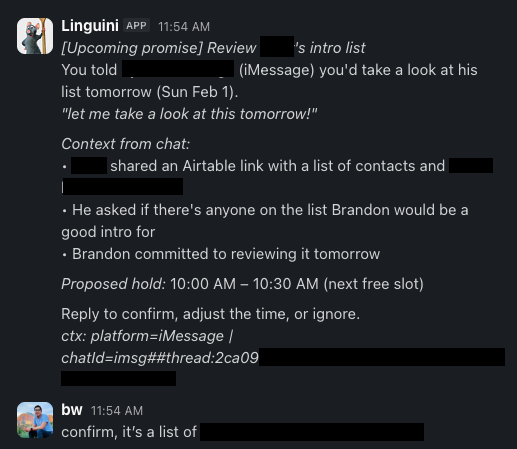
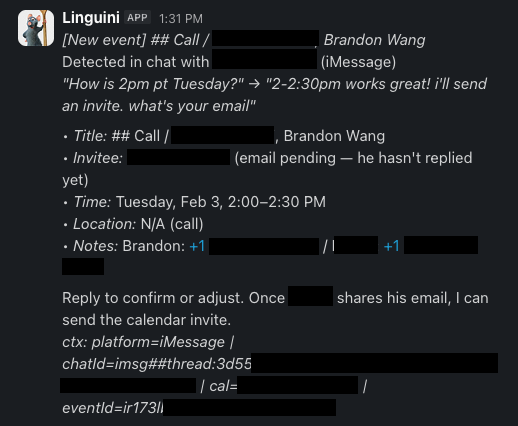
every 15 minutes, openclaw looks through new text messages i've received, using a script to identify threads where i've sent a message since it last checked. (it ignores threads where i haven't engaged.)
if it finds that i've made a specific promise about doing something tomorrow ("let me review this tomorrow!") it will create a calendar event for me the next day when i'm free.
if specific plans are being made—for example, offering a meeting slot to someone—it will automatically drop a "hold" onto my calendar so that i don't double book myself. openclaw also checks: is there a time, place, and mutual confirmation? if there is, it drafts a calendar invite and asks me if i'd like to create it.
these two automations alone have helped me become more responsive and less forgetful. more importantly, they help text messages catch up to email. we've long had great tooling for email—superhuman automatically reminds me to follow up on emails and brings up my calendar in a sidebar when i type a date. texting is the wild west and yet i text 100x more than i email.
preparing for the next day
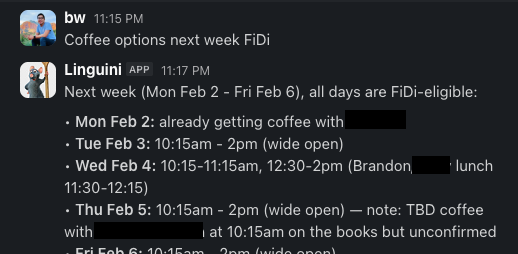
at 8pm every night, openclaw goes through my calendar for the next day and identifies meetings—coffee chats, lunches, phone calls, and more. it sends me a quick summary. as a natural introvert, it's helpful to prepare in advance whether a day will be a "big day of meetings" or a heads down day. this also ensures i wake up and get to the office on time.
simplifying group chatter
i'm in a few communities with whatsapp and signal groups that have high volume (100+ messages a day). i typically mute these, but openclaw goes through them once a day and summarizes interesting topics or conversations for me.
monitoring things
complex price alerts
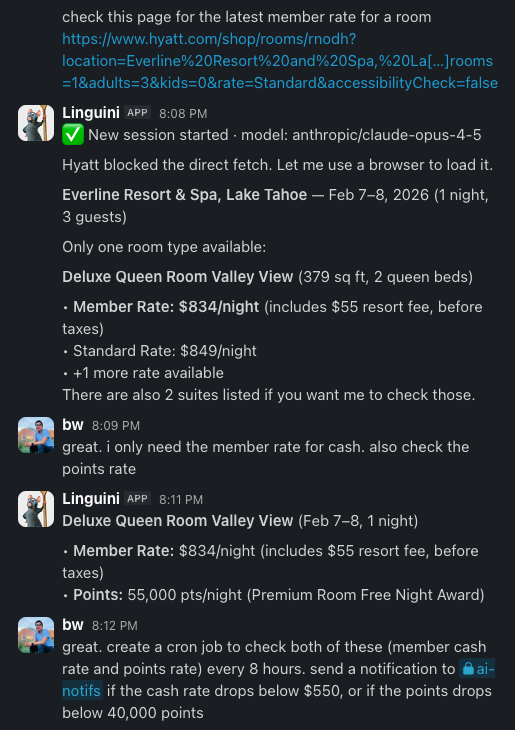
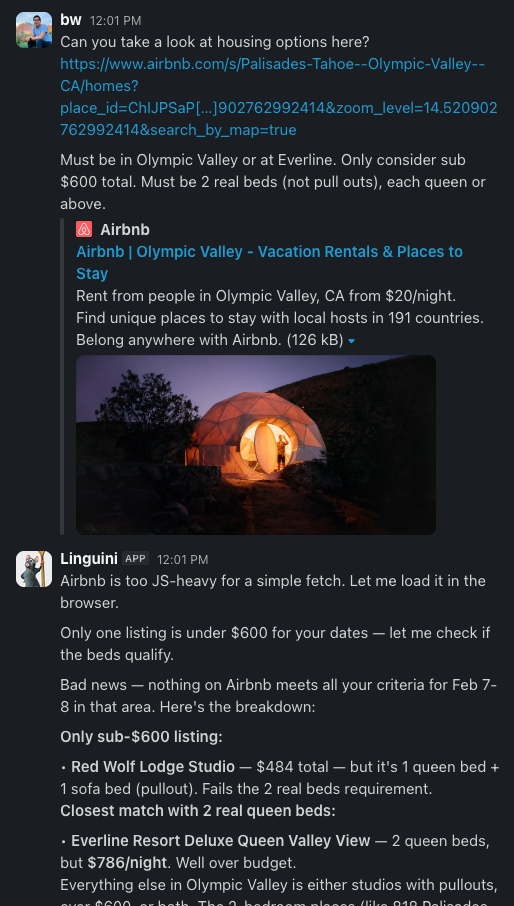
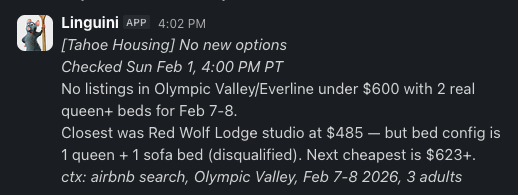
it's stunningly easy to monitor the price of something now, even if it's complicated. whereas before i would go looking for a price alert website, now i just paste the URL into openclaw and tell it to check every few hours if the price has changed.
i currently have over 30 price alerts set. these include straightforward alerts on products i'm interested in buying. but they also include powerful reasoning guidelines, like hotels and airbnbs in lake tahoe where "a pullout bed is OK if it's not in the same room as another bed." openclaw actually reviews the photos on the listing to ensure they fit these criteria!
i am curious to try more complex criteria that are currently impossible traditionally (like avoiding hotel rooms that don't have a door to the bathroom) or even subjective criteria (vibe of the room is clean and renovated, not old and dingy).
or monitoring anything
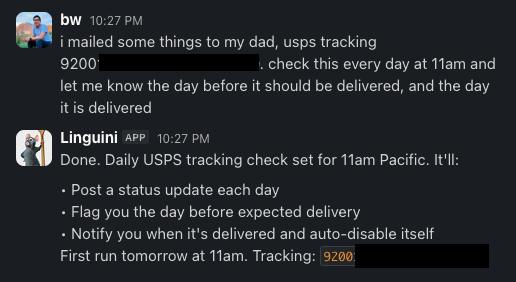
it turns out that openclaw’s website + cron functionality is good enough to monitor basically anything. while i pay for several apps like flighty (flight monitoring) and parcel (package tracking), i’ve started to gravitate towards simply asking openclaw to track these things instead.
for example, with a USPS tracking number, it can let me know every day what the progress of my package is. when something seems stuck in transit, it flags it. i no longer have to dig through emails or remember which carrier is delivering what. even opening the parcel app to add a tracking number seems like unnecessary work now.
household logistics
freezer inventory
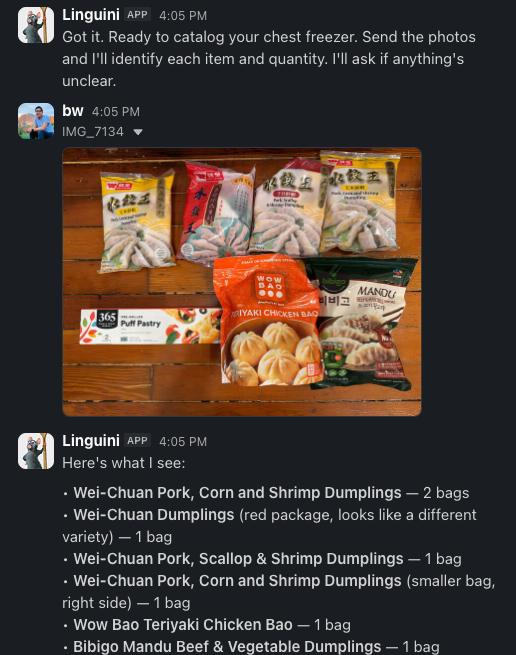
as someone who has a chest freezer and a compulsive desire to buy too many things at costco, we take everything out of the freezer every few months to check what we have. before, this was a relatively involved process: me calling things out, my partner writing them down.
now, i take pictures of everything in the freezer and send them to openclaw, which parses through each picture (asking me if it's confused about anything). it makes reasonable assumptions on remaining quantities and adds the inventory to a list in notion. it also removes items from our grocery list if we're already well-stocked.
grocery list
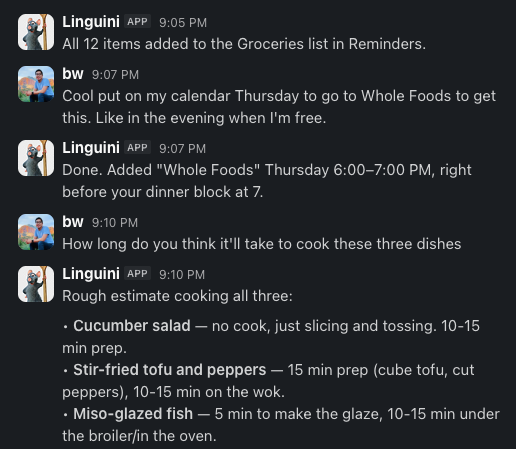
i'm sure this exists in some complicated form via the NYT cooking app, but i now screenshot recipes and send the ingredient list to openclaw, which organizes them into our grocery list in apple reminders. it's smart enough to dedupe and combine ingredients already on the list (as well as ignore ingredients we already have)—2 carrots becomes 3 if the recipe calls for more.
booking and forms
resy and opentable
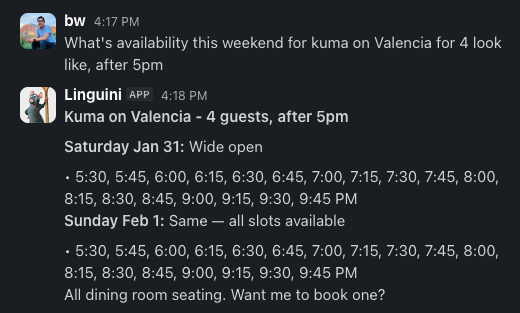
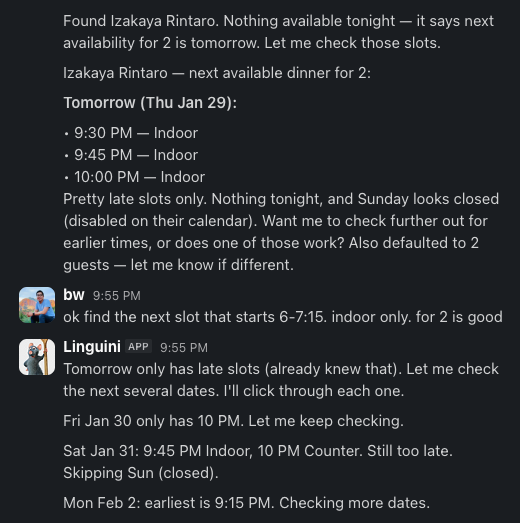
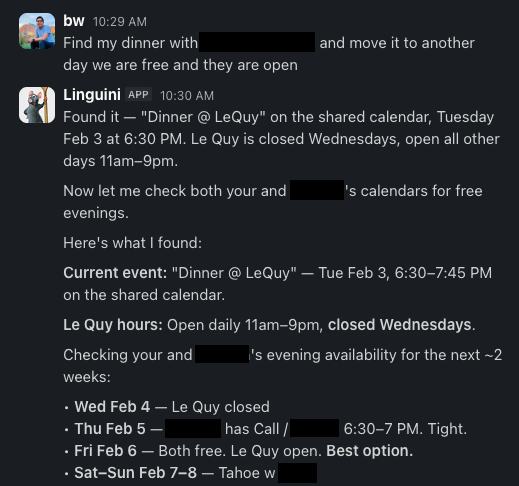
openclaw can log into resy and opentable as me (it even enters the 2FA code it finds in my texts). i haven't automated anything here, but booking a table by talking to openclaw is delightful.
for my partner and me, it looks through our calendars to find evenings when we're both free and the restaurant we want has availability (including clicking through resy slots page by page—something i used to do myself). it then suggests options back to me to confirm, filling in all my preferences.
dentist appointments
openclaw knows when i'm due for a cleaning and can see my calendar. when i ask it to book an appointment, it logs into my dentist's portal, finds a slot that works (and where i will already be near the dentist office), and confirms with me before booking. one less thing to forget about.
filling out forms
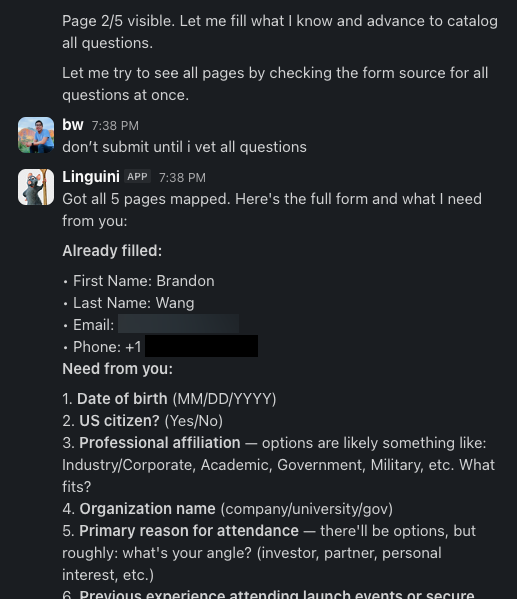
one thing i'm experimenting with, as openclaw has more context about me, is whether i can trust it to fill out forms on my behalf—for example, to book a vendor. openclaw takes a first stab at answering any questions it knows the answer to and then asks me for the rest in a slack message. we workshop the answers back and forth and then openclaw submits the form.
it occasionally gets lost in nested frames (which decreases my trust in its ability to do this well), but it's remarkably persistent at making it through a lengthy questionnaire, even across multiple pages. it also has a lovely intuitive sense for many things—like unchecking marketing emails.
unexpected wins
better todo creation
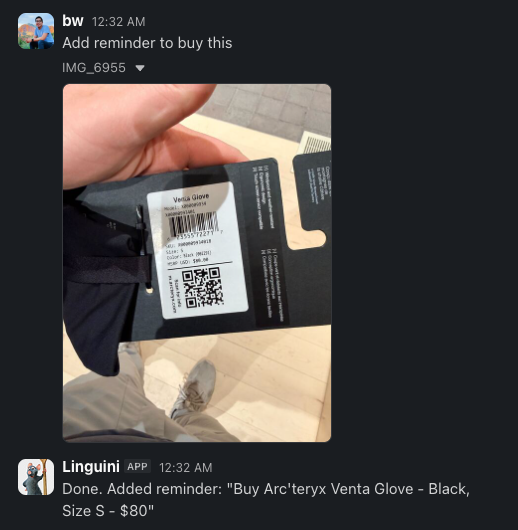
openclaw is just better at making todo items than i am.
when i visited REI this weekend to find running shoes for my partner, i took a picture of the shoe and sent it to openclaw to remind myself to buy them later in a different color not available in store. the todo item openclaw created was exceptionally detailed—pulling out the brand, model, and size—and even adding the product listing URL it found on the REI website.
giving me visibility
through the course of dialing in my openclaw, it has created many tools, skills, workflows, and preferences. this is one of the beauties of openclaw (and LLMs with memory in general): they get better as you use them, and they are genuinely remarkable at learning your preferences.
i sometimes nudge this along by explicitly asking openclaw to "make a note" of various requests—for example, how a calendar event title should be formatted.
to get visibility into how this process is going (mostly out of curiosity), openclaw writes a human-readable version of each workflow and pushes it up to a notion database. these workflows can be incredibly intricate and detailed as it learns to navigate different edge cases.
for example, if a resy restaurant has a reservation cancellation fee, openclaw now informs me of the fee, asks me to confirm again if it's not refundable, and includes the cancellation deadline in the calendar event it creates.
these are little things that take months or years to dial in. with openclaw, this was nearly single shot.
seeing these workflows in notion (1) awes me with how much i've built up in very little time, with almost no conscious "configuration" in the traditional sense; and (2) with notion's version control, i get a diff view to see how each workflow has evolved over time. both are incredibly satisfying for the engineer in me.
on the shape of risk
let me be upfront about how much access i've given openclaw: it can read my text messages, including two-factor authentication codes. it can log into my bank. it has my calendar, my notion, my contacts. it can browse the web and take actions on my behalf. in theory, openclaw could drain my bank account. this makes a lot of people uncomfortable (me included, even now).
sometimes i think about delegation more generally. i recognize this is not a universal experience, but to frame the tradeoffs i think about my (human) personal assistant who helps me with various tasks. to do her job, she has my credit card information, access to my calendar, copies of my flight confirmations, and a document with my family's passport numbers. she is abroad and i've never met her in person.
i trust her because i've built trust over time but also because i have to. without that trust—without sharing my secrets—she cannot do her job. the help and the risk are inseparable.
all delegation involves risk. with a human assistant, the risks include: intentional misuse (she could run off with my credit card), accidents (her computer could get stolen), or social engineering (someone could impersonate me and request information from her).
with openclaw, i'm trading those risks for a different set: prompt injection attacks, model hallucinations, security misconfigurations on my end, and the general unpredictability of an emerging technology. i think these risks are completely different and lead to a different set of considerations (for example, openclaw's default configuration has a ton of personality to be fun and chaotic on purpose, which feels unnecessarily risky to me).
the increase in risk is largely correlated to the increase in helpfulness. the people most at risk from AI assistants are the people getting the most value from them. my learning is that the first bits of risk led to a lot more helpfulness.
if something isn't working or useful, i do take the permission away. i also take precautions—i run openclaw on an isolated machine and constrain which sites it visits. when i'm unsure what it's doing, i ask it to take a screenshot; this has been invaluable for catching mistakes and building trust in new workflows. but i also have it do things that would make most security professionals wince, like reading my 2FA codes and logging into my bank.
what surprised me most was how quickly i found myself wanting to give it more access, not less. every new permission unlocked something useful, and the value accumulated faster than my caution could keep up. most of the online discourse is about locking it down; my experience has been the opposite pull. it comes down to whether the value justifies the risk for you.
on rewiring ourselves
the discourse around openclaw has been polar and, because some people have been overtly evangelical, many critics feel astroturfed or otherwise sold to.
amongst smart people i know there's a surprisingly high correlation between those who continue to be unimpressed by AI and those who use a hobbled version of it. for some it's a company-issued version of chatgpt/gemini with memory disabled, and for others it's a self-inflicted decision to limit LLM memory, context, and tools (usually anchored around safety and risk).
we're taught that limiting scope is good (keeps the AI focused) and safe (keeps bad things from happening). this is true but my experiences with openclaw completely fried this teaching. the sweet sweet elixir of context is a real "feel the AGI" moment and it's hard to go back without feeling like i would be willingly living my most important relationship in amnesia.
this isn't a novel insight—companies know that context is the whole game and are working to organize their data for AI. but for individuals, this world has been closed off. your AI interactions are flat and stateless—data in, response out, nothing building over time. when google announced gemini's gmail integration, people got excited: finally, an AI that knows me! but when they tried it, it was shallow and disappointing and couldn't figure out your spirit animal from your email style, and they moved on.
if you have even a slight curiosity about this kind of thing, i'd encourage you to try it yourself—it's easier to build and better than you might expect. three things have stood out for me:
gathering, improving, actioning
i think productivity lift from AI use falls into three phases: gathering information, improving it, and actioning on it. most usage today focuses on the middle—you gather data yourself, hand it to the AI to improve, then action on it yourself.
for knowledge work, this makes sense. there's a lot to improve—summarizing, translating, critiquing. but personal AI is different. there's not much to improve; you already know what needs to happen. the lift comes from gathering and actioning.
making calendar events is uninteresting. figuring out when one needs to happen—by monitoring my texts—and then creating it for me? that's interesting.
one place to start: how can you take data from one place and move it to another isolated system? from your text messages to a restaurant booking? from granola meeting notes to a follow-up email?
embrace flexibility
if you're engineer-brained like me, you gravitate towards scripts and playbooks—whatever you can do to constrain the AI and make its behavior predictable. this works, and for high-stakes situations it might be the only way to get comfortable.
but the upside to letting go has been 10x, not 10%. i didn't see that coming. it's the same thing i've heard from people using claude code—you can't understand how much you're leaving on the table until you let go. the whole reason i'm using an LLM and not a traditional script is that it can handle ambiguity, interpret intent, and figure things out on the fly.
early on, i wanted openclaw to fetch web pages as text only, believing that to be safer (it is). if i'd stuck to that, i would never have discovered it could look through airbnb listing photos to find a place matching my exact criteria ("a pullout bed is okay if it's not in the same room as another bed"). i didn't program that. i just described what i wanted and let it figure out how. not spelling out how i wanted openclaw to work made it a LOT better.
continuous improvement
a current AI engineering adage: treat AI like a junior software engineer. guide it through building a plan, watch its first attempts carefully, challenge its reasoning.
this applies to openclaw too, but it requires patience. it's easy to give up on a workflow when you watch it fumble ("let me try clicking this again. didn't work. let me try again.").
resist the urge to write openclaw off. if you're worried, ask it what it plans to do before it does it and ask for a screenshot when you want to verify it's got the right page open. when an edge case breaks a workflow, treat it as a teaching opportunity. once you've corrected it, it won't make that mistake again.
openclaw gets meaningfully better the more you use it, and it gets better in a fast, organic way that feels less cumbersome than writing rules for claude code or yelling at any other LLM. it feels much closer to working with a real executive assistant (in part because the openclaw harness/system prompts are very good), which makes me want to give it more and more responsibility.
how’d you set it up?
(this is a more technical deep dive, for those interested in setting this up themselves.)
i run openclaw on a mac mini in my home. the mac mini's primary job is running openclaw and it stays on 24/7. why a mac mini?
- one of the core use cases is browsing websites and sometimes logging into them. to do this convincingly (without triggering tons of captchas and "is this a new IP?" alerts), openclaw needs to be opening sites from my home, not the cloud; and it needs to do so in a real google chrome window.
- many of the ways openclaw accesses data are mac-only. specifically, openclaw can read and send iMessages (real blue bubbles!); manage my todo and grocery lists in apple reminders; and use my apple contacts as a source of truth. apple will only let you do these things without getting banned on a real bona fide mac.
i communicate with openclaw via a private slack workspace. many others have shot themselves in the foot setting it up on whatsapp or telegram (since the bot responds as you to others). slack is great because:
- it's familiar to me—i've spent over a decade working in and managing slack workspaces.
- slack supports rich formatting, image attachments, and has a great mobile app.
- i can create separate channels for different topics. #ai-notifs is only for inbound alerts.
- i can have several workflows going at once, since each channel's history is isolated. i created #ai-1, #ai-2, #ai-3, and so on—just for multitasking. (i may explore adding my partner at some point, and it'll be easy since slack is, well, meant for multiplayer.)
openclaw communicates with me by sending slack notifications. behind the scenes it also makes changes to my calendar—moving events around, adding "soft hold" events, sending invites—and manages my apple reminders and notion pages. openclaw never communicates with others on its own.
i give openclaw a toolkit of access. the most useful ones have been:
- my text messages. i conduct a lot of work and daily life over imessage. frustratingly, unlike email, texting has very poor tooling. where my email app automatically pulls up my calendar when it sees dates/times, texting me "call tomorrow 4pm?" does not. when someone sends me a calendar invite, it's both in my inbox and on my calendar; when someone texts me "yep let's do it", neither is true. openclaw has given me massive lift here. (yes, this also gives openclaw access to 2FA codes.)
- my calendar. i also have a shared calendar with my partner; openclaw sees both.
- my notion workspace. for me this is a general catch-all for storing and managing information; the apple notes app could also work.
- web browsing. in a way this is the most important one—it's infinite tools in one. but it's also where the risk concentrates, so i always give openclaw a starting URL rather than letting it browse freely.
notably, i haven't given openclaw access to my email—my tooling there is already good enough that i usually do things myself. i’ve also found the ways openclaw can help here to be cumbersome and limited. i may revisit if i find a killer use case.
things i haven't done
- i don't allow my openclaw to access social networking websites (it doesn't read x/twitter, for example). this seems high risk and no reward.
- i don't give openclaw access to all my logins. (there's a 1password integration which is... pretty wild.) when i do, i try to use google chrome's native password manager so that openclaw doesn't need to manage passwords in context directly. (note that it still has access to passwords because it can autofill and then read it off the page, but i've at least added more hoops.)
- i don't let openclaw send text messages without my explicit approval, and i've built safeguards in those skills to enforce this.
- i didn't add my openclaw to moltbook so it can plot against me at my expense. sorry.
rough edges
- i use claude opus 4.5. i haven't experimented with cheaper models. my view is that any mistake by the model costs me way more than the premium, so i'd rather stay on the cutting edge than try to optimize for tokens.
- context management can be annoying. when openclaw is browsing sites or doing research, context occasionally fills up and gets compacted (older conversation history gets deleted to make room). this always seems to happen at the worst time—right when i'm deep into something and have built up momentum. a frustrating "ugh, i guess this really is just a word predictor" moment. to avoid this i'm constantly starting new sessions, which i wish openclaw would do for me.
- openclaw doesn't know when to give up. its determination is usually a strength, but it lacks the human circuit breaker of "am i trying too hard here?" and sometimes burns through a lot of time/tokens on something a human would have abandoned.
i'm not claiming everyone needs to live this way. but if you've ever thought "i wish i could automate this" or "why doesn't this just happen for me"—openclaw is surprisingly good at making that real.